OpenAI Unveils GPT-5-Codex
On September 16, 2025, OpenAI released its new model, GPT-5-Codex, a version specifically optimized for software engineering based on GPT-5, enhancing its agentic coding capabilities.
OpenAI’s blog noted that GPT-5-Codex is trained with a focus on practical software engineering tasks, dynamically adjusting its thinking time based on the task, and can work independently for over 7 hours on large, complex tasks.
In benchmark tests, GPT-5-Codex showed improvements in accuracy and high-impact comments in code reviews compared to GPT-5.
Within two hours of its release, OpenAI co-founder and CEO Sam Altman revealed on X that GPT-5-Codex accounted for about 40% of Codex’s total traffic, with expectations to exceed half that day.
GPT-5-Codex is available in all developer scenarios using Codex, serving as the default tool for cloud tasks and code reviews. Developers can also extend its use through the Codex command-line interface (CLI) or integrated development environments (IDE).
OpenAI first introduced the open-source programming agent Codex CLI in April and the web version in May. Two weeks ago, Codex was integrated into a single product experience accessible via ChatGPT accounts, allowing developers to seamlessly transition between local and cloud environments without losing context.
Codex is included in subscription packages for ChatGPT Plus, Pro, Business, education, and enterprise users, with the Plus, education, and Business plans supporting several focused coding sessions weekly. OpenAI plans to soon offer GPT-5-Codex in the API for developers using Codex CLI with an API key.
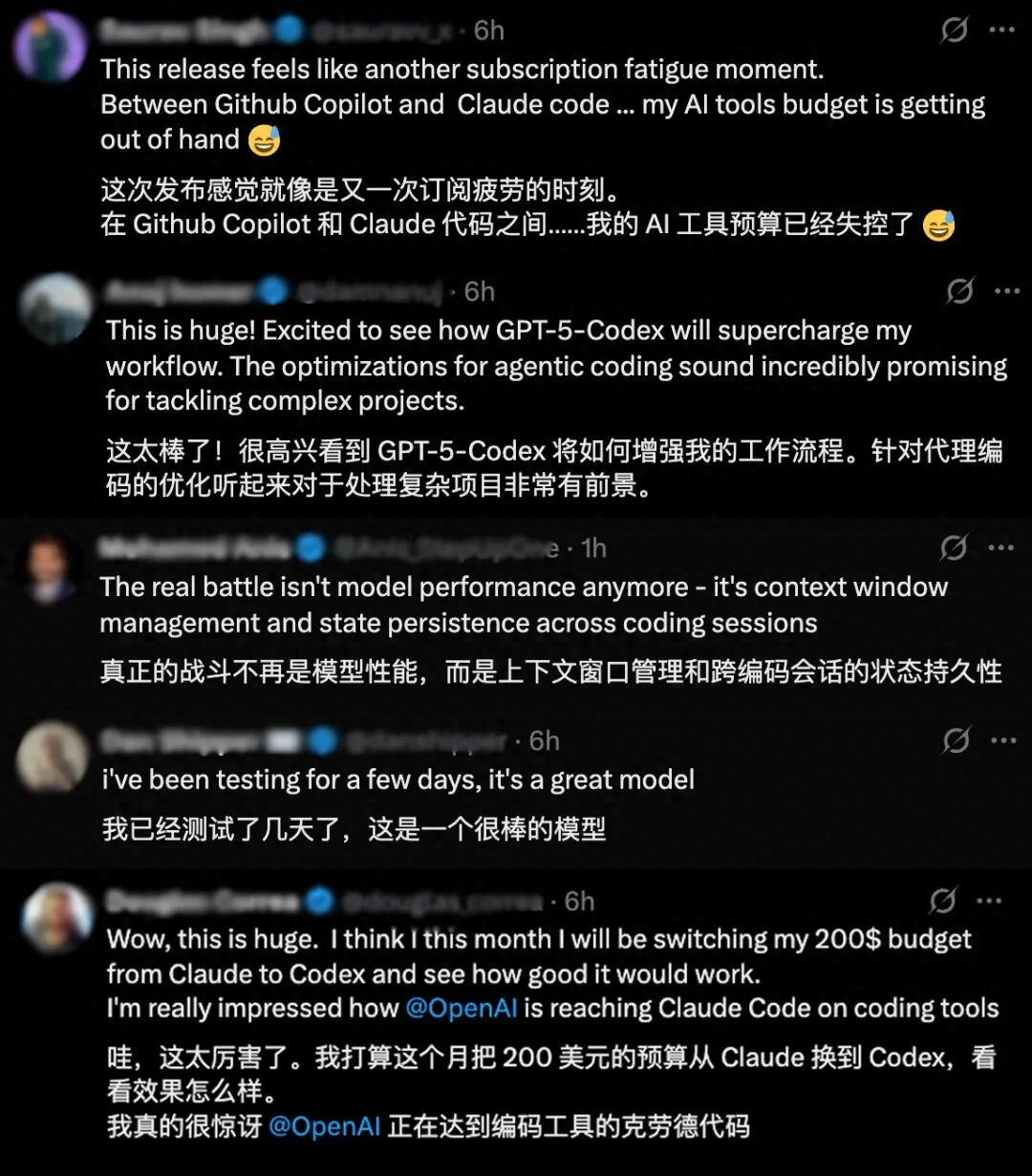
Developers have expressed optimism about this new release’s potential for handling complex projects, while some have raised concerns about their AI tool subscription budgets.
Dynamic Thinking Time Adjustment
GPT-5-Codex is trained on complex real-world engineering tasks, such as building complete projects from scratch, adding features, testing, debugging, executing large-scale refactoring, and conducting code reviews. It follows AGENTS.md instructions more effectively and generates high-quality code, allowing developers to specify their needs without lengthy coding style or cleanliness explanations.
Additionally, GPT-5-Codex dynamically adjusts its thinking time based on task complexity, with execution times ranging from seconds to 7 hours. This model combines two essential skills of programming agents: pairing with developers in interactive sessions and executing longer tasks independently. This means Codex feels more agile when handling small, well-defined requests or chatting and can work longer on complex tasks like large refactoring.
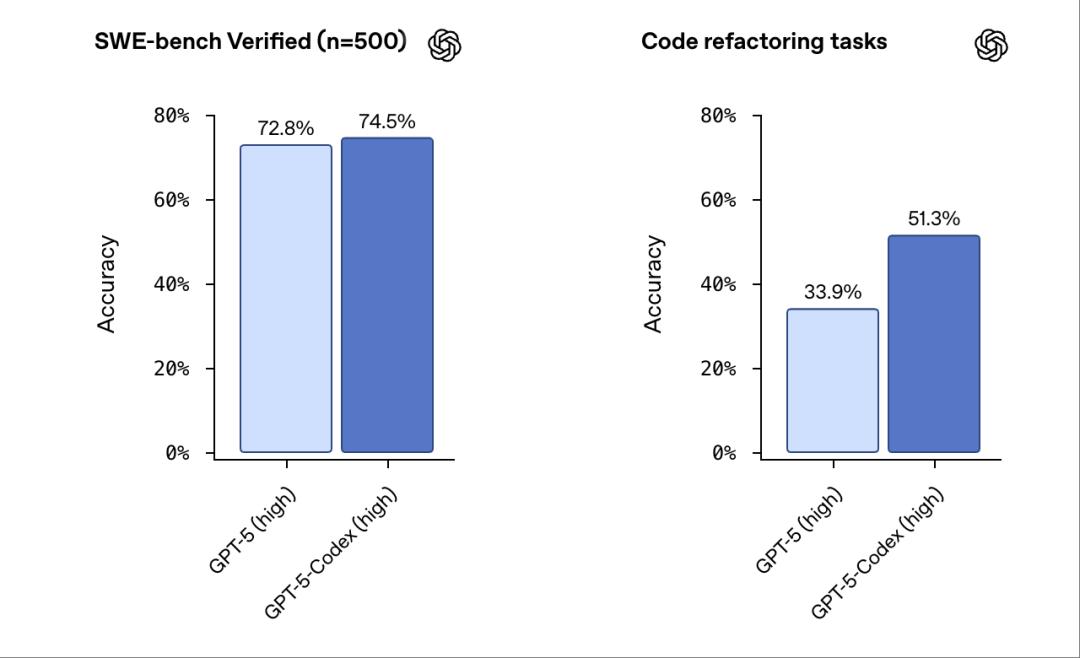
Historically, OpenAI has only published results for 477 benchmark tests measuring the model’s ability to solve real software engineering tasks due to infrastructure limitations. This issue has now been resolved, and OpenAI can publish results for all 500 tasks. GPT-5-Codex achieved a 74.5% accuracy rate in these benchmarks, compared to GPT-5’s 72.8%.
OpenAI tested the new model’s code refactoring ability based on tasks involving refactoring styles from large mature codebases, covering programming languages like Python, Go, and OCaml. GPT-5-Codex achieved 51.3% accuracy in these tests, while GPT-5 scored 33.9%.
In tests, researchers found that GPT-5-Codex could independently handle large, complex tasks for over 7 hours, iteratively achieving, fixing testing errors, and ultimately delivering successfully.
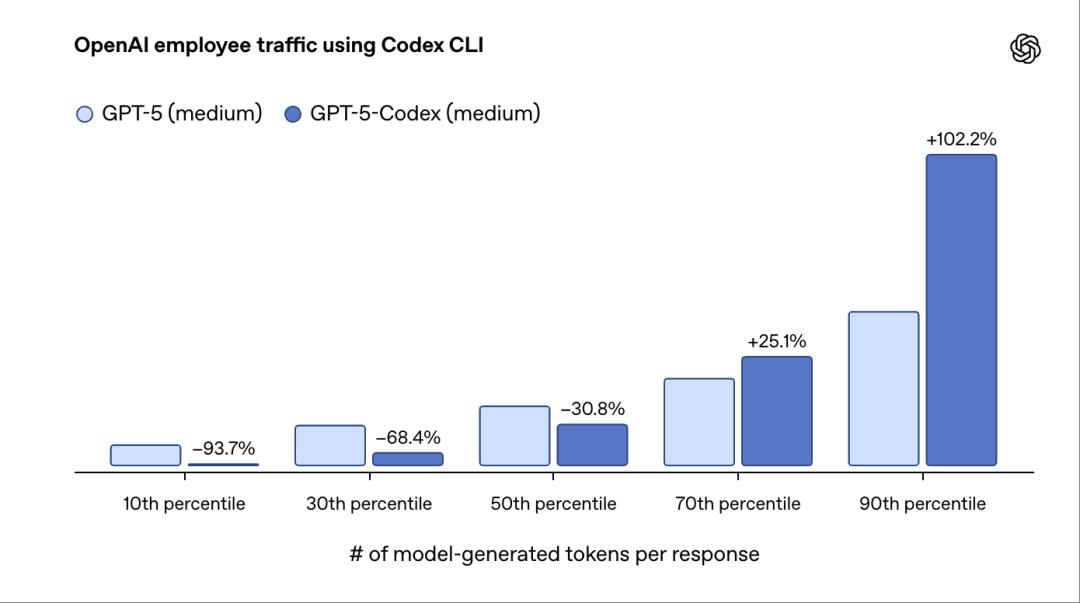
Based on internal usage data, researchers noted that when sorting user interaction rounds by the number of tokens generated by the model, the bottom 10% of cases generated 93.7% fewer tokens with GPT-5-Codex compared to GPT-5. Conversely, the top 10% of cases showed that GPT-5-Codex spent twice as much time on reasoning, code editing, testing, and iteration.
GPT-5-Codex can also perform code reviews and identify critical defects. During reviews, it browses developers’ codebases, infers dependencies, and runs code and tests to verify correctness.
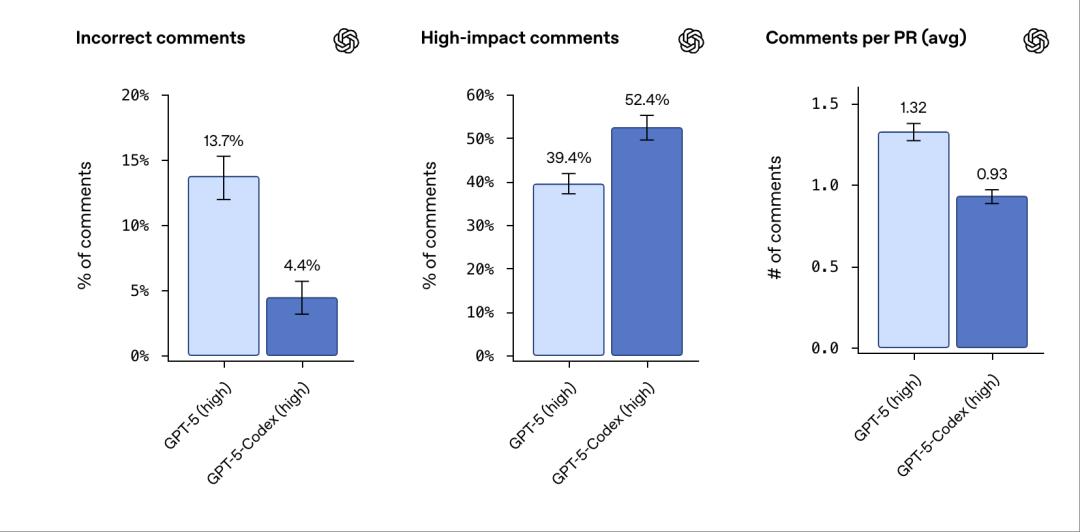
OpenAI evaluated the performance of code reviews on recent submissions in popular open-source repositories, where experienced software engineers assess the correctness and significance of review comments for each submission.
GPT-5’s error comments were about 13.7%, while GPT-5-Codex’s were only 4.4%. In terms of high-impact comments, GPT-5 had 39.4%, while GPT-5-Codex had 52.4%. The average number of comments per pull request was 1.32 for GPT-5 and 0.9 for GPT-5-Codex.
They found that GPT-5-Codex’s opinions are less likely to be erroneous or unimportant.
According to TechCrunch, OpenAI Codex product lead Alexander Embiricos stated in a briefing that the performance improvements of GPT-5-Codex are largely due to its dynamic thinking capability. Users may be familiar with the real-time router in GPT-5, which directs queries to different models based on task complexity. GPT-5-Codex operates similarly but without a built-in router, allowing real-time adjustments to task processing time. This is an advantage over routers, which initially determine how much computational power and time to allocate to a problem, whereas GPT-5-Codex can decide to spend an additional hour five minutes into the problem.
OpenAI’s official blog also mentioned that unlike the general model GPT-5, they recommend developers use GPT-5-Codex only for agentic programming tasks in Codex or similar environments.
Three Core Improvements for Automated Agentic Programming Workflows
Additionally, OpenAI has made recent updates, including an improved Codex CLI and new Codex IDE extensions.
First, Improvements to Codex CLI
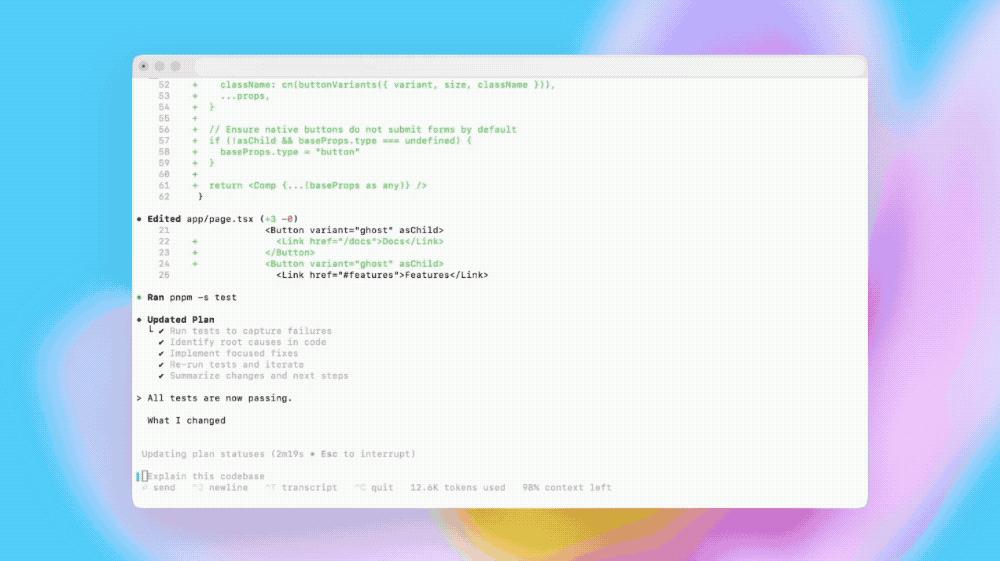
Based on feedback from the open-source community, OpenAI has rebuilt the Codex CLI around agentic programming workflows. Developers can now attach and share images directly in the CLI, including screenshots, wireframes, and diagrams, to build shared context based on design decisions and accurately capture the required content.
For more complex tasks, Codex can now track progress using a to-do list and includes tools for web searches and MCP to connect external systems, improving overall tool usage accuracy.
The terminal user interface upgrades include better tool invocation and more understandable diff display formats.
Approval modes have been simplified into three levels: read-only (requires explicit approval), automatic (requires full access to the workspace but approval outside the workspace), and full access (can read files anywhere and run commands over the network). It also supports compressing dialogue states, making it easier for developers to manage longer sessions.
Secondly, Codex IDE Extensions
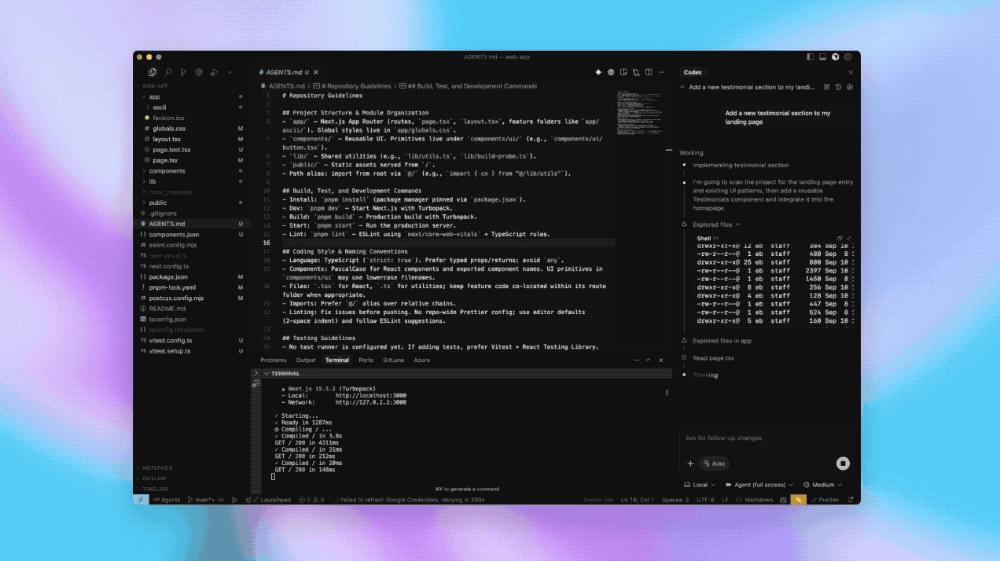
This IDE extension allows Codex agents to integrate with VS Code, Cursor, and other VS Code-derived editors, enabling them to preview local code changes and collaboratively edit code with Codex.
When developers use Codex in the IDE, they can obtain results with shorter commands, as Codex can leverage contextual information, such as open files or selected code snippets.
The Codex IDE extension allows developers to switch workflows between cloud and local environments without leaving the editor, creating new cloud tasks, tracking ongoing work, and viewing completed tasks.
For final code adjustments, it can directly open cloud tasks in the IDE, with Codex retaining all relevant context information.
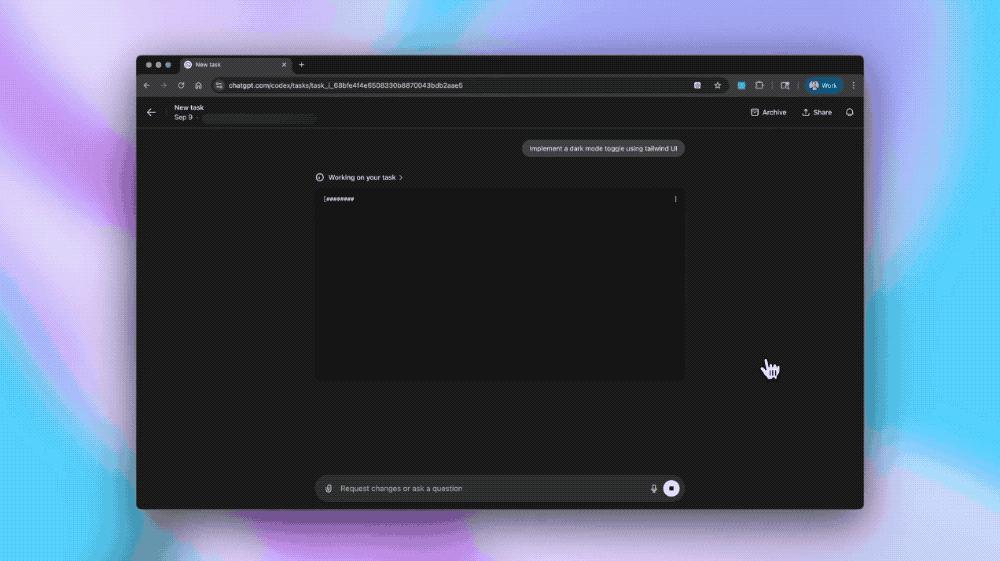
Furthermore, OpenAI has been enhancing the performance of its cloud infrastructure, reducing the average completion time for new and subsequent tasks by 90% through caching containers. Codex can now automatically set up environments by scanning and executing common installation scripts; with configurable internet access permissions, it can execute commands like pip install at runtime to fetch dependencies as needed.
As with the CLI and IDE extensions, developers can now share frontend design specifications with Codex by uploading images, such as interface prototypes, visual drafts, or screenshots of UI bugs or style anomalies.
When building frontend content, Codex can autonomously launch a browser to review the constructed effects and iterate optimally, ultimately attaching screenshots of the results to the corresponding tasks and GitHub pull requests.
In code reviews, Codex can be used to identify critical defects.
Unlike static analysis tools, it can match the development intentions declared in pull requests with actual differences, reasoning across the entire codebase and dependencies, and verifying actual runtime behavior through code execution and test cases.
Once developers enable Codex in a GitHub repository, Codex automatically reviews pull requests when they transition from draft to ready status, publishing analysis results on that pull request.
If Codex suggests modifications, developers can have Codex implement those changes directly in the same dialogue thread.
Developers can also explicitly mention @codex review in pull requests to request reviews, such as @codex review for security vulnerabilities or @codex review for outdated dependencies.
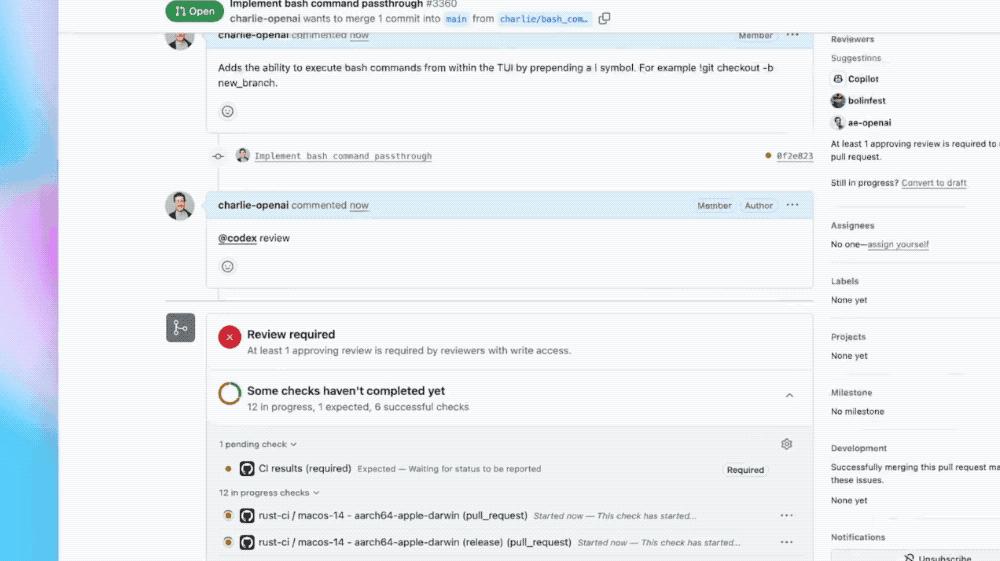
Codex is currently used internally at OpenAI to review the majority of its pull requests, identifying hundreds of issues daily, often before manual reviews begin.
Conclusion: The AI Programming Tool Competition Heats Up
Currently, the competition among AI programming tools has intensified, with major products like OpenAI Codex, Claude Code, Anysphere Cursor, and Microsoft GitHub Copilot battling it out. Additionally, Cursor’s annual recurring revenue (ARR) surpassed $500 million by early 2025, and the AI code editor Windsurf faced a chaotic acquisition, leading to its team being split between Google and Cognition.
OpenAI Codex’s recent upgrade, launching a new model optimized for agentic programming, significantly enhances its automation and collaboration capabilities, demonstrating the escalating intensity of the AI programming tool competition.
Comments
Discussion is powered by Giscus (GitHub Discussions). Add
repo,repoID,category, andcategoryIDunder[params.comments.giscus]inhugo.tomlusing the values from the Giscus setup tool.