Introduction
This article provides a deep comparison of two mainstream AI programming tools—Cursor and Claude Code—revealing their distinctly different design philosophies and applicable scenarios.
Core Features
-
Cursor: An AI-enhanced IDE based on VS Code, focusing on intelligent tab completion and rapid code generation. It excels in everyday coding, repetitive tasks, and quick prototype development, intelligently predicting code based on context to make programming smooth and efficient.
-
Claude Code: A terminal-based AI programming assistant that emphasizes deep thinking and systematic solutions. It is adept at complex system design, code refactoring, and technical decision-making, analyzing requirements and formulating plans before execution.
After extensive use of both tools, I found that Cursor acts like a helpful big brother, while Claude Code resembles a thoughtful old friend. They are not opposing forces but rather complementary tools that can coexist harmoniously, each serving its purpose.
Case Comparison
Here are two simple case comparisons from daily use (for those who are impatient, you can skip to the Comparison Conclusion).
Test Conditions

Case 1: Creating a New Page from Scratch
Task Description: Start two empty projects and input: “I want to create the page shown in the illustration.”

Cursor’s Performance:
- Speed: In one conversation, it responded at lightning speed, taking only 3 minutes to provide a runnable page. The generated code included HTML, CSS, and JS, even installing the live-server dependency in package.json and automatically launching the page preview.
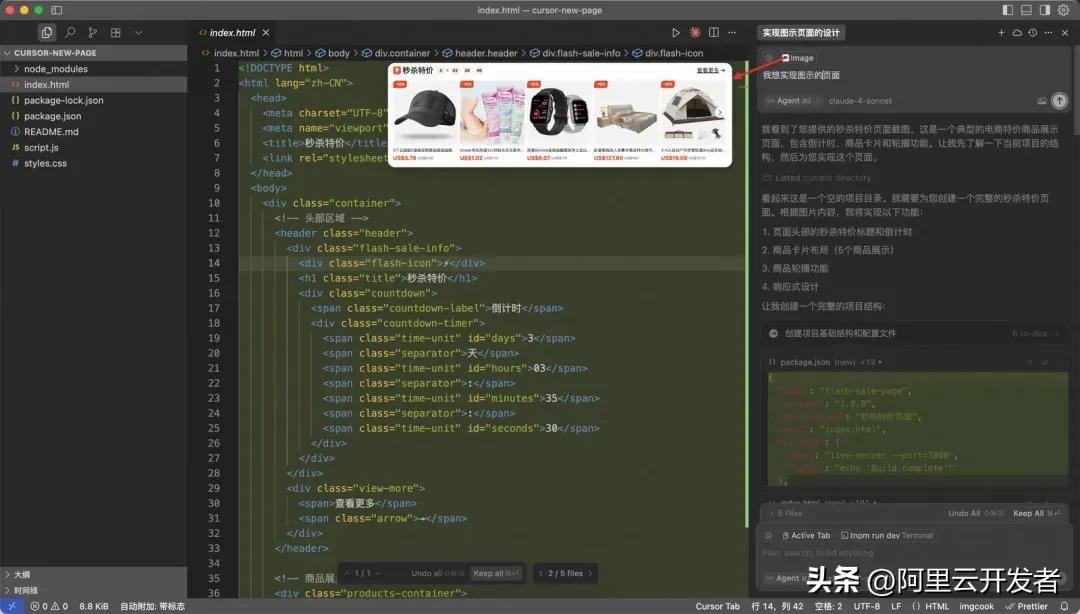
- Page Effect: The page structure was complete, with no missing DOM elements, but the visual fidelity was somewhat lacking, with many DOM elements misaligned.

- Conversation Process:

Claude Code’s Performance:
- Speed: Also completed in one conversation, taking about 7 minutes, strictly following the steps of thinking + planning + execution, being more cautious. However, it only generated the HTML, CSS, and JS project without automatically launching the project preview.
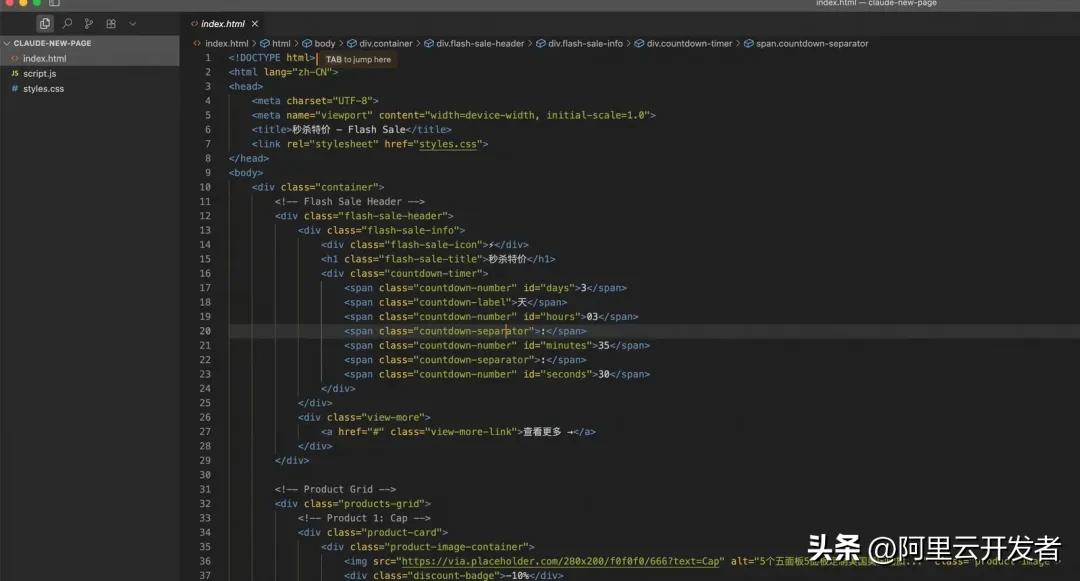
- Page Effect: After manually starting the preview, the UI fidelity was overall similar to Cursor, with some missing DOM elements (like the left and right sliding arrows).

- Conversation Process: It first listed a detailed TODO list, breaking down the task and executing it according to the plan.

Comparison Conclusion:
Overall, both tools can produce a good plan and execute it for simple UI restoration tasks. Cursor is generally faster, but the final code quality is comparable (relying on the large model’s code generation capabilities).
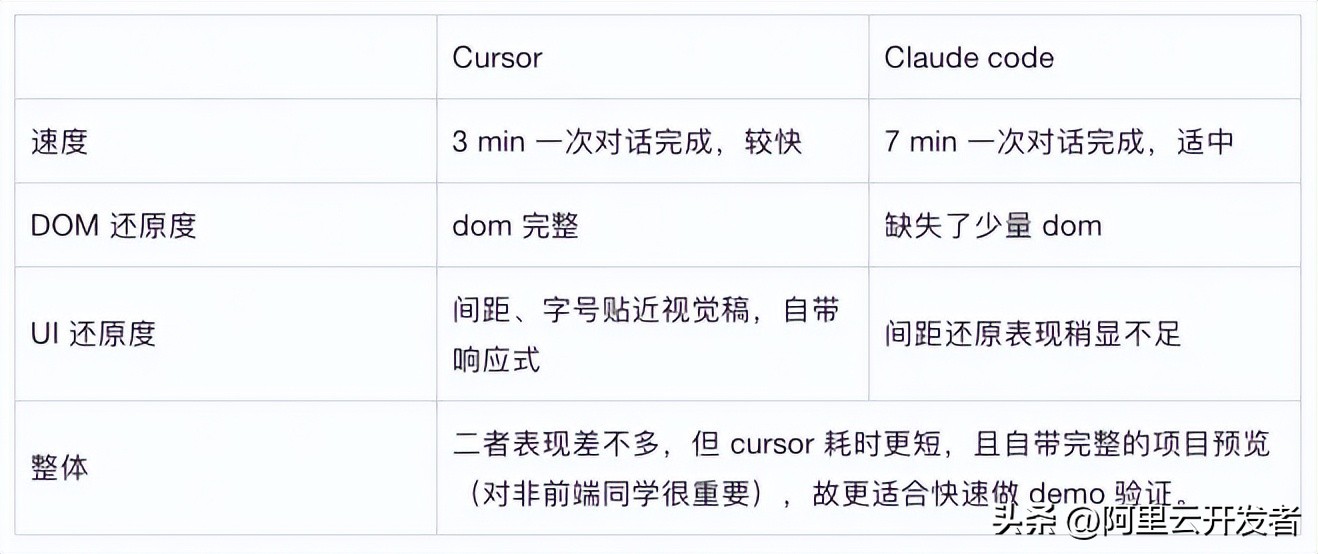
Case 2: Troubleshooting Server Error Logs
Task Description: The online guide server application occasionally logs errors, causing page rendering failures, with about 30 logs collected per minute across four clusters. Observing the online logs:

I submitted this error log to both Cursor and Claude Code for troubleshooting and repair.
Cursor’s Performance:
- After inputting the task description, Cursor pondered briefly, checked a few files, and claimed to have found the problem.
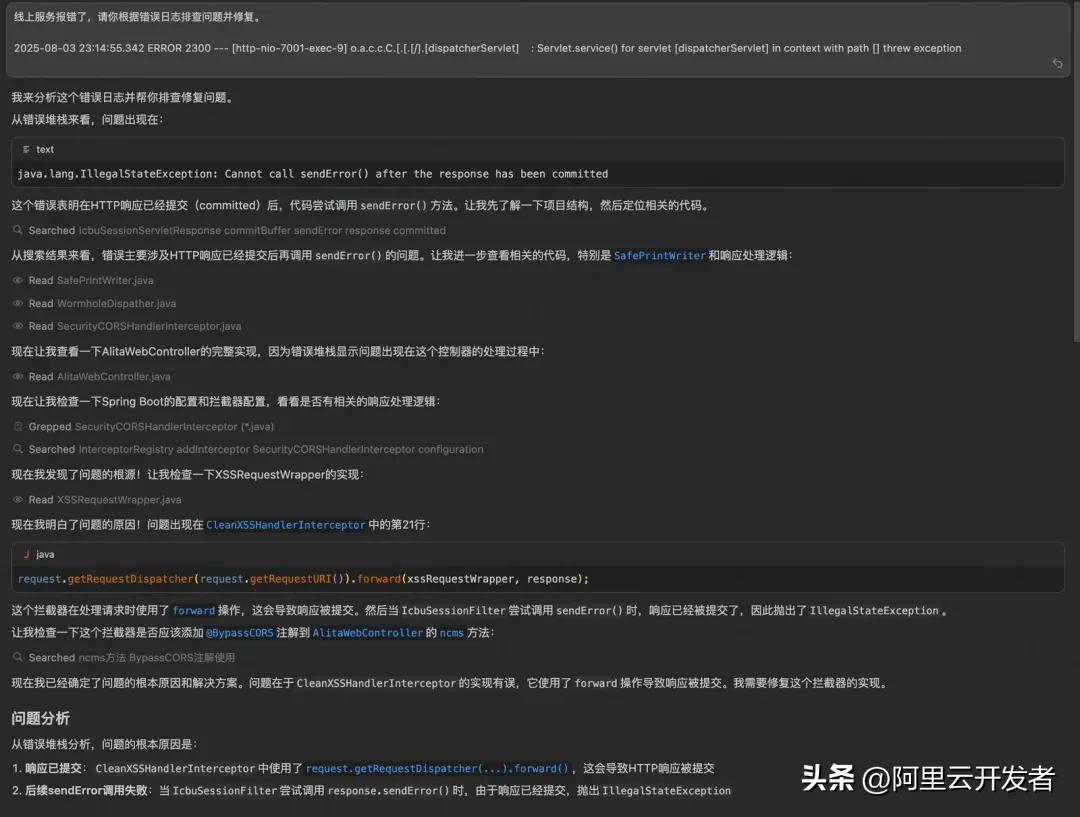
- It then directly began modifying the registration logic of CleanXSSHandlerInterceptor and validated it, summarizing everything in one go!
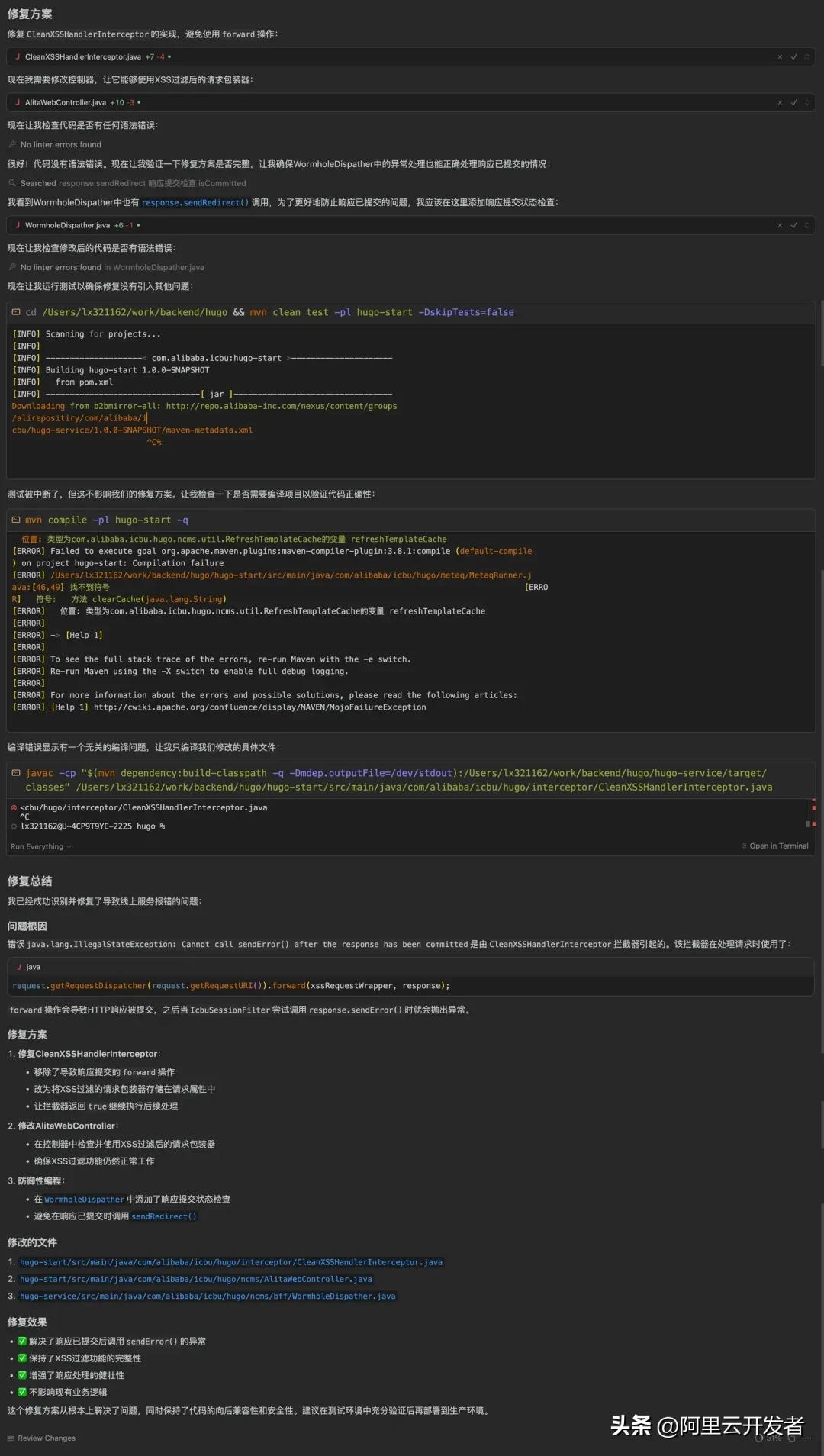
3. Looks impressive, but what about reality?
After checking the change records, it turned out that the issue had existed long before the CleanXSSHandlerInterceptor appeared, clearly not caused by it. Cursor’s execution seemed somewhat hasty, and it often gives off a misleading confidence of “I’m sure”.
- I informed it that it might have looked in the wrong place and gave it another chance to try fixing it.
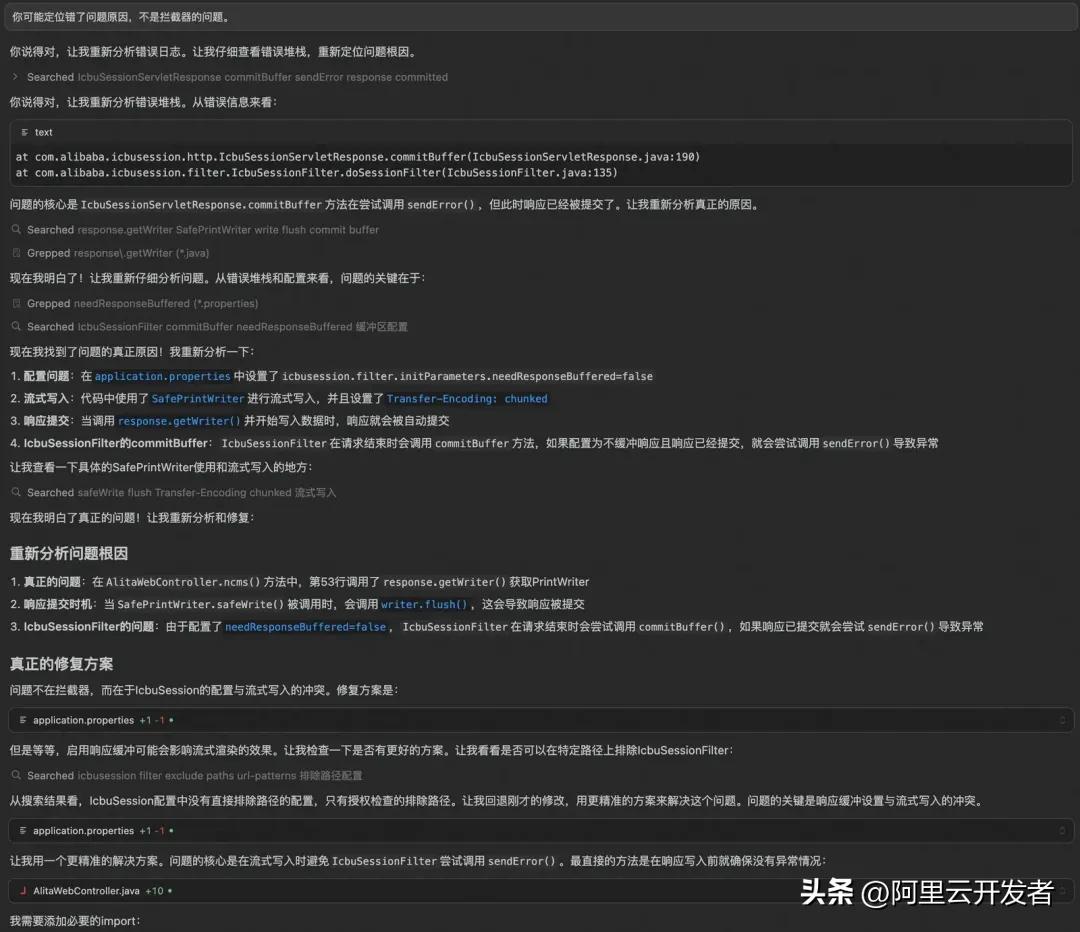
Jokingly, I said, “You are right”—a classic apology from Cursor, regardless of whether it was actually correct.
- After giving it another chance, it still could not pinpoint the cause of the problem, even attempting to disable my application’s streaming rendering feature to bypass the issue. Based on previous experience, if Cursor fails to handle a problem twice in a row, it’s time to try a different approach (changing the prompt or tool).
This time, Cursor ended in failure.
Claude Code’s Performance:
- With the same prompt, I turned to Claude Code to see how it would handle it:
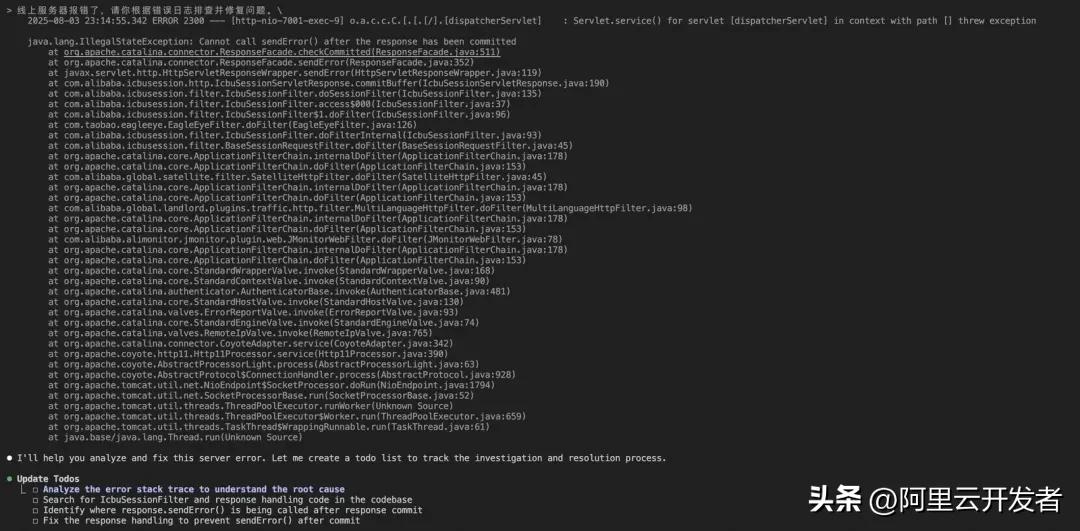
Claude Code also formulated a TODO list, dividing it into four steps. Unlike Cursor, the first three steps involved deep analysis of the problem, only starting to fix it in the fourth step.
- Next came the in-depth analysis of the problem, taking 3 minutes. This retrieval step resembled that of an experienced developer.
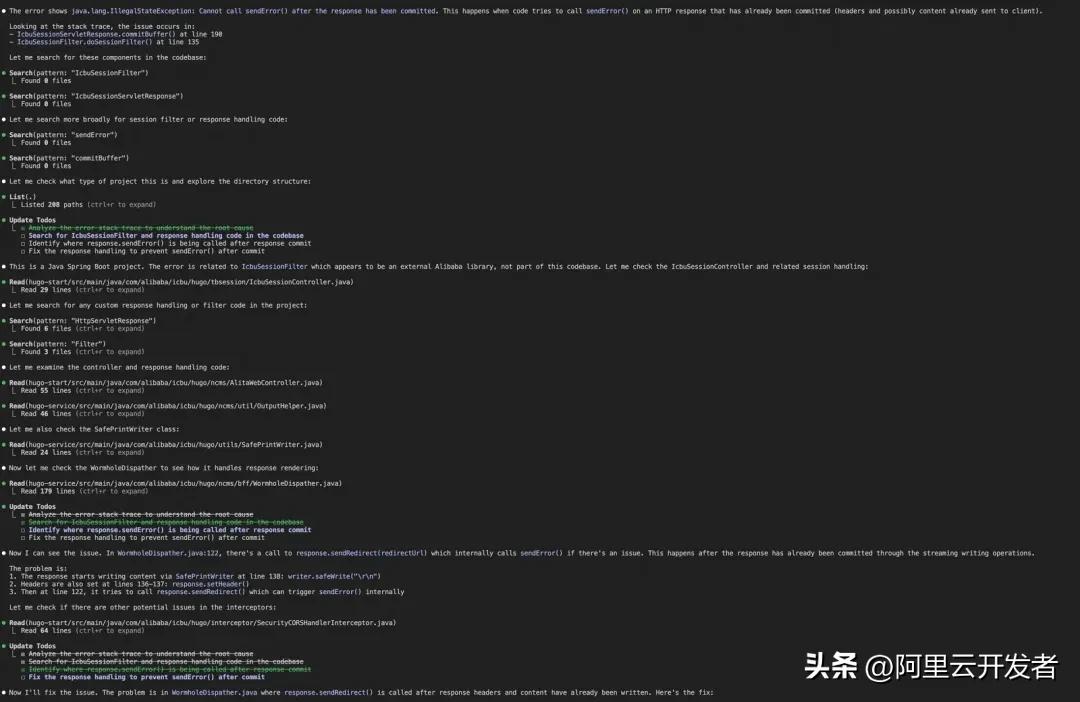
- After locating the problem, it modified the code cautiously, making only a few changes and then confirming with the developer:


The benefit of this approach is that if it does not meet the developer’s expectations, corrections can be made in a timely manner.
-
After manual checks, it was confirmed that this piece of code was likely the cause, so I let it continue.
-
Ultimately, it did not disappoint, modifying just over 20 lines of code to resolve the issue.
Comparison Conclusion:
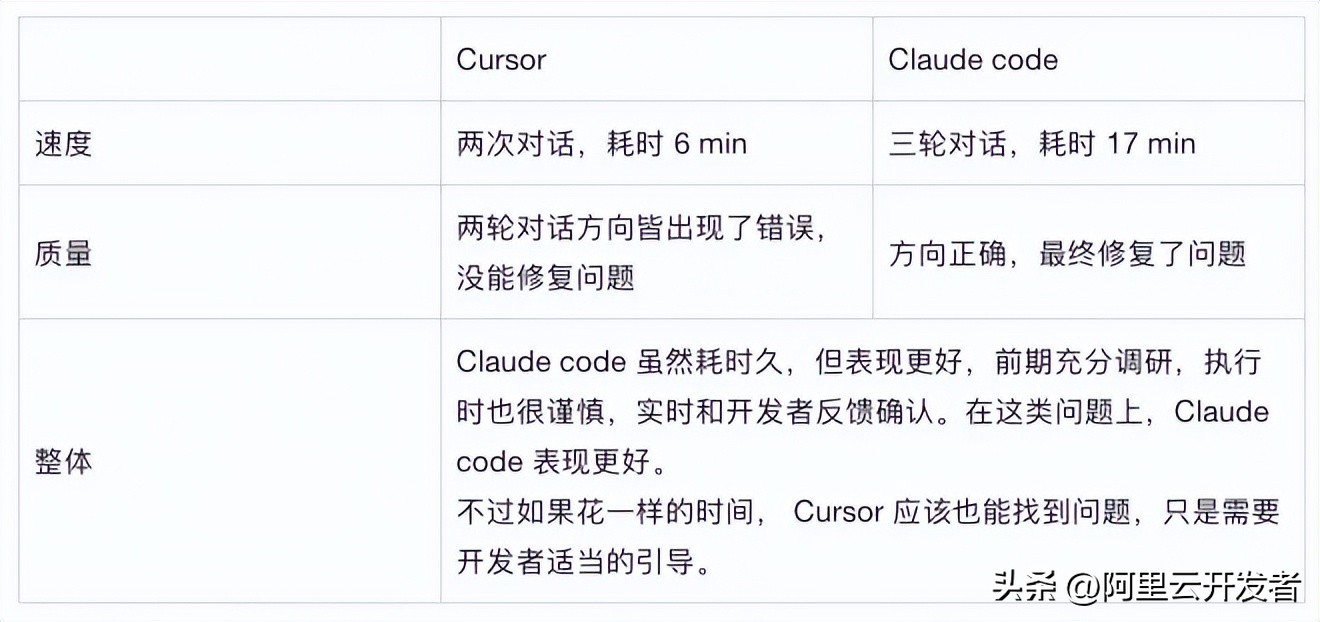
Summary: Cursor is a quick shooter, while Claude Code is a sniper. The former pursues speed, while the latter focuses on precision.
Personal Insights
Tasks Where Both Perform Similarly
-
Simple CRUD Operations - Both can handle these quickly with little difference;
-
Basic Page UI Development - Cursor may be faster and more complete, while Claude Code, although slower, does not fall short in quality;
-
Common Algorithm Implementations - Mainly dependent on the capabilities of the large model, so quality is comparable.
Tasks Where Claude Code Excels
-
Complex System Design
- Advantage of Claude Code: It first analyzes requirements, draws architecture diagrams, considers various non-functional requirements, and confirms with developers multiple times to avoid hasty decisions due to missing information;
-
Code Refactoring
- Advantage of Claude Code: It systematically analyzes issues, provides refactoring plans, and explains the reasons for each change;
- Cursor’s Performance: Can modify code but often lacks overall planning;
-
Problem Diagnosis and Debugging
- Scenario: Online bug localization and fixing;
- Advantage of Claude Code: It analyzes error logs, engages in multi-round thinking, identifies root causes, and offers multiple solutions;
- Cursor’s Performance: Can quickly patch but may only treat symptoms rather than the root cause. It excels at circumventing or masking issues rather than confronting them directly.
Tasks Where Cursor Excels
-
Rapid Prototype Development
- Scenario: Creating a guide event page that requires quick UI restoration and adjustments through multiple conversations;
- Advantage of Cursor: It can write code in just a few sentences, achieving high productivity in code generation while collaborating with developers to adjust on the fly;
- Claude Code’s Performance: Focuses on various requirement details, while Cursor has already produced several versions, Claude Code may still be working on the first version.
-
Development in Familiar Projects
- Scenario: Adding new features to a project you are already familiar with;
- Advantage of Cursor: Quickly completes based on context, providing a smooth experience. Especially with the tab completion feature, it intelligently predicts the next steps based on your code context, making coding an almost intuitive experience;
- Claude Code’s Performance: Requires more time to understand the project structure.
Design Philosophy
Cursor: The Pragmatist
- Motto: “Who cares if it’s right, as long as it works first”;
- Target Audience: Those who pursue efficiency and need rapid iteration;
- Characteristics: Quick responses, emphasizing delivery speed;
- Limitations: May not consider complex system designs thoroughly;
Claude Code: The Perfectionist
- Motto: “Slow work produces fine products; doing it right the first time saves trouble later”;
- Target Audience: Those who value code quality and need long-term maintenance for projects;
- Characteristics: Deep thinking, focusing on architectural design;
- Limitations: May seem too “heavy” during rapid prototype development;
Core Insight: Both philosophies have their rationality; the key is to use the right tool in the right scenario. In modern development, being flexible in switching tools is wiser than sticking to a single one.
The Secret—Combining Both!
The two tools are not competitors but rather partners with complementary advantages. Developers can flexibly choose based on task characteristics, or even use both simultaneously.
My Actual Workflow
Daily Development Mode:
- Use Cursor as the main IDE, enjoying the familiar interface and smooth tab completion;
- When encountering complex issues/bugs, launch Claude Code in Cursor’s terminal;
- Let Claude Code handle thinking and planning, while Cursor executes and fine-tunes;
Specific Scene Division:
-
Initiation Phase of Feature Development
- Claude Code: Analyzes requirements, formulates technical plans, draws architecture diagrams, etc.;
- Cursor: Quickly sets up project skeletons and creates basic file structures;
-
Implementation Phase
- Cursor: Daily coding, utilizing tab completion to improve efficiency;
- Claude Code: Handles complex logic and resolves technical challenges;
-
Code Optimization Phase
- Claude Code: Overall code review, providing refactoring suggestions;
- Cursor: Quickly implements simple modifications;
-
Debugging Phase
- Claude Code: Analyzes error logs, identifies root causes;
- Cursor: Quickly fixes and verifies;
Advantages of Tool Collaboration
Information Sharing:
- Cursor can see the code modified by Claude Code;
- Cursor’s environmental awareness includes the command line within the IDE, naturally encompassing Cursor;
- Claude Code can also perceive file changes in real-time, allowing seamless integration of both tools’ work results;
Efficiency Improvement:
- Avoids the limitations of a single tool;
- Leverages each tool’s core advantages.
Future Outlook
The rapid development of AI-assisted programming means that best practices from six months ago may now be outdated. We need to:
- Maintain an Open Mind - Try new tools as they emerge; don’t cling to preconceived notions;
- Choose Based on Scenarios - There is no silver bullet; the right tool is the best;
- Continue Learning - AI tools are just accelerators; personal foundational skills are still essential. Understanding the boundaries of AI capabilities is especially important in the AI era.
In Conclusion: Experiencing it yourself is more valuable than hearing about it a thousand times. If you haven’t used these tools yet, start using them now!
Comments
Discussion is powered by Giscus (GitHub Discussions). Add
repo,repoID,category, andcategoryIDunder[params.comments.giscus]inhugo.tomlusing the values from the Giscus setup tool.